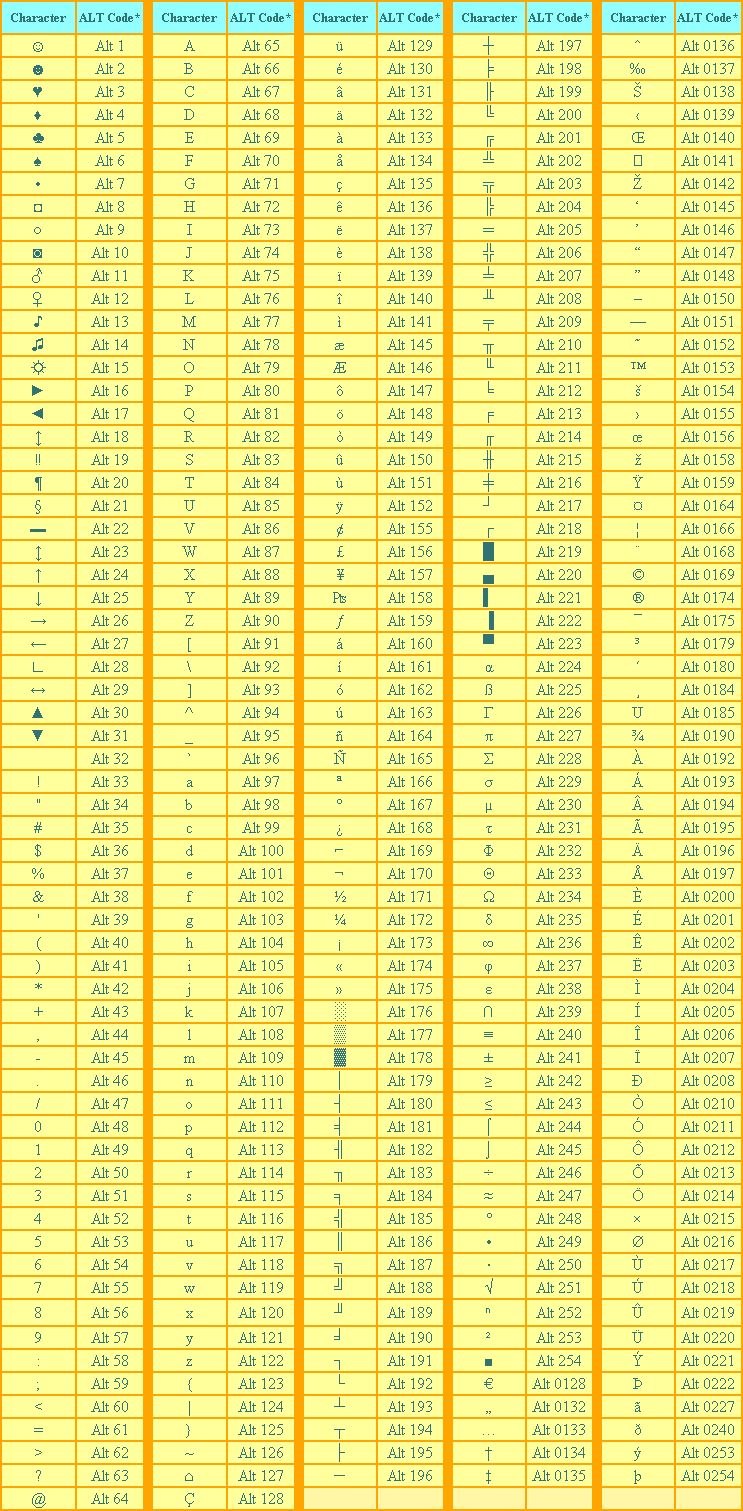
§To obtain an ALT Character:
- Make certain that the Num Lock key has been pressed to activate the numeric key section of the keyboard.
- Depress the Alt key.
- While the Alt key is depressed, type the proper sequence of numbers (on the numeric keypad) of the ALT code from the table above.
- Release the Alt key, and the character will appear.
†Some browsers do not recognize all of the ALT Characters. Since each of the characters in the table above is virtually unique, seeing multiple cells of the same character most likely indicates that your browser does not recognize the codes of some of the characters. Therefore, it does not know what those characters should look like, and it inserts its own character each time. If this is the case for you, then view a graphic image of how the table should look.
*There are some gaps in the numerical sequence of ALT Character codes because either those items do not exist, or else they are duplicates of characters listed elsewhere. Many Special ALT Characters, Special HTML Characters, and Special Characters are the same.
Some word processing programs and browsers will not recognize all Alt characters.


No comments:
Post a Comment